

Glide is primarily a travel management application. It mainly allows its users to find reliable & trustworthy information, schedule trips efficiently, manage time & budgets and participate in a community, all in a single app.
.png)
Primary age group : 25-34 y/o
Secondary age group : 35-44 y/o
Working adults into pre-peak of their career.
Planning a travel trip is tiring and time consuming for most people
Travel information scattered across multiple platforms
Systematically structure and father information all into a single app
Provide trip planning convenience and flexibility to users with easy to use features paired with budget management tools.
Creating a feature allowing users to connect and share information reharding travel experiences.
A pleasant app with good visual and information grouping.
A community more closely knit for a better overall user experience and increased user retention for the app.
.png)
Glide is the motion associated with a smooth and a continuous motion. This motion perfectly describes this app as it provides users with a seamless experience in travel planning.

.png)
Summer vacation is almost here. Isabelle intends to plan a trip to Krabi, Thailand and invite some of her friends along on this trip. In order to ensure synchronous communication between Isabelle and her friends, she uses the Glide app planner to get everyone on board. They used the app together to get accurate information about the main attractions, activities and culture there. They also plan on choosing the most strategic location for their accommodation along with the transportation modes.
The user flow is based on 2 situations
1) User already knows where to travel
2) User does not know where to travel yet
.png)
After the user flow was constructed, I proceeded to create the wireframes in relation to the flow to showcase the skeletal structure of the app with its information and design layout.

Here are some of the high fidelity mockup screens I have created to give a better perspective on what the final product will look and feel like to the user. I have also included some key features that may help enhance user experience of the Glide app.
By building an interactive community whereby users of the same platform can communicate and share experiences with one another, can lead to a better travel experience for all.
I found out that using icons in certain situations are more direct and less likely to frustrate its users by giving direct cues and function of a certain button. In other situations like presenting location details, would be better if there were photos to provide a better experience.
In this project, there were many touchpoints for users to navigate from. Therefore it was rewarding to stay focused and consistent with the brand guidelines in order to create a cohesive experience.
Project name
Netflix Go
Role
UX & UI Designer
Duration
October 13, 2021 - 3 weeks
Project Summary
Netflix Go is a conceptual app design that allows its users to conveniently schedule and set reminder for their favorite TV shows amidst their busy day to day routine.
.png)
The goal of this project is to create a user experience that allows users to schedule their anticipated TV shows and set reminders so that they do not miss out on their favourite shows.
Most streaming applications have watchlist functions but does not have the scheduling/reminder feature gap in which NETFLIX GO aims to fill up.
• Creating a smooth & pleasant scheduling experience
• Designing UI that matches with Netflix brand guidelines
• Providing overall navigational convenience for the app
I asked some questions which i think is important in determining the app's problem solving direction. I have also decided to conduct competitive analysis on potential competitors to better understand gaps that could be filled in the market.
What is the product?
Who is it for?
Who will be the main users for this product?
What features might be the best to solve user painpoints?
Why would anyone use this product?
How is the user journey like?
I looked at several potential competitors that are offering similar services and tried to understand their strenghts and weaknesses.
Most of the features from the direct competitors are very similar. However, there were also some differences that I noticed.
.png)
Conclusion : Most of the features from the direct competitors are very similar. However, there were also some differences that I noticed (eg ; Device coverage & Regional availability)

Daniel has been a psychology assistant for 3 years. He has an active lifestyle that involves a lot of sporting activities which he enjoys a lot as a way to relieve work stress. Daniel also enjoys watching movies/tv series with his girlfriend when they settled in the night.
Frustrations :
"Sometimes I have trouble keeping up/remembering movies or series to watch"

Felicia is an accomplished woman in her field of work in economics. She is a busy woman having the need to take care of her two children and a pet dog with her husband at her side. Felicia enjoys watching documentaries of nature as it helps her to relax and marvel at the natural wonders of the world.
Frustrations :
"Having the need to take care of my two kids after work is exhausting, I wish there was a systemic reminder so that I don't miss my favorite shows.
.png)
-min.jpg)
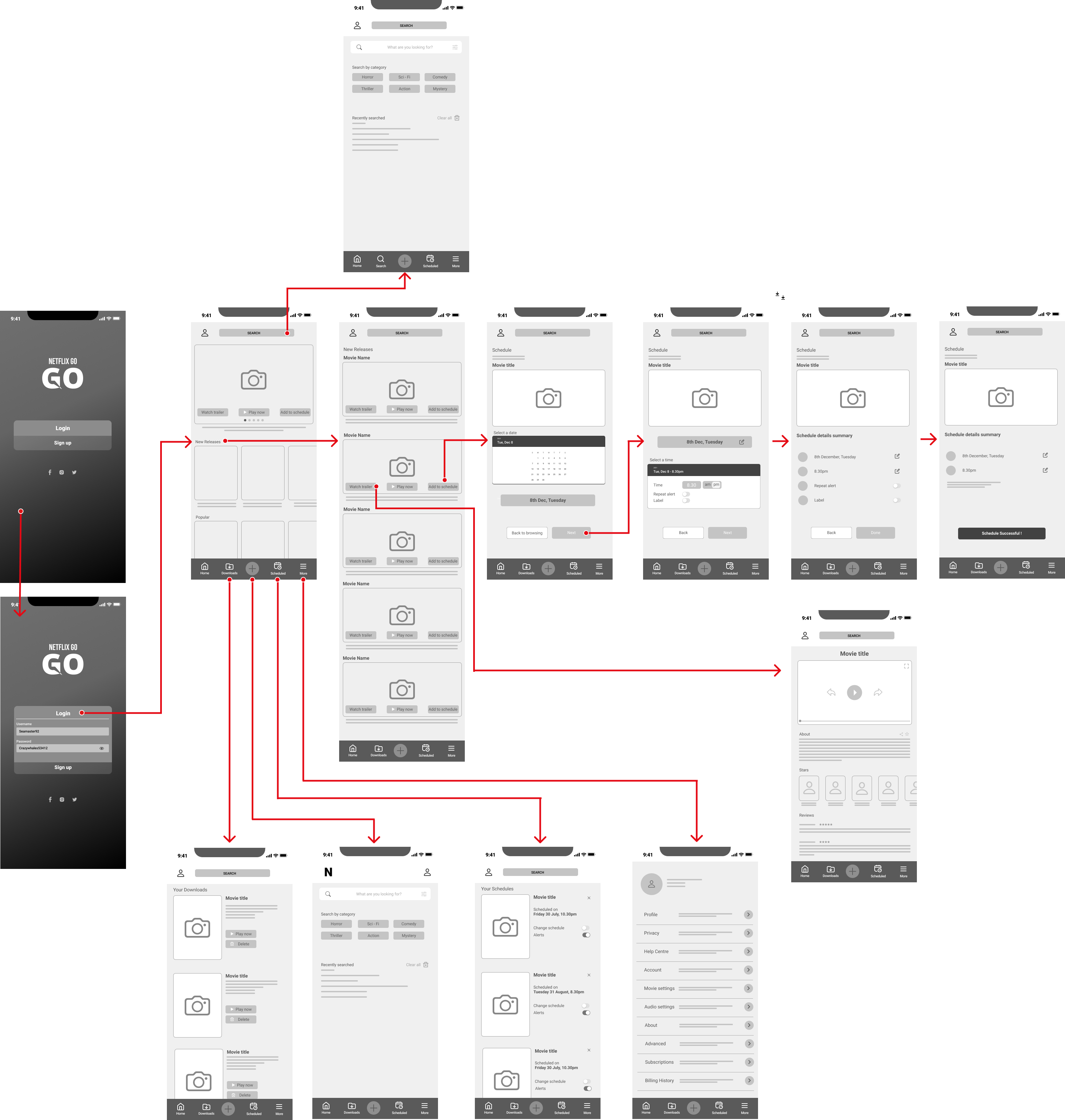
Paper wireframes was created as an inexpensive and quick method to get an idea and feel of what the app would look like in its raw form.
.png)
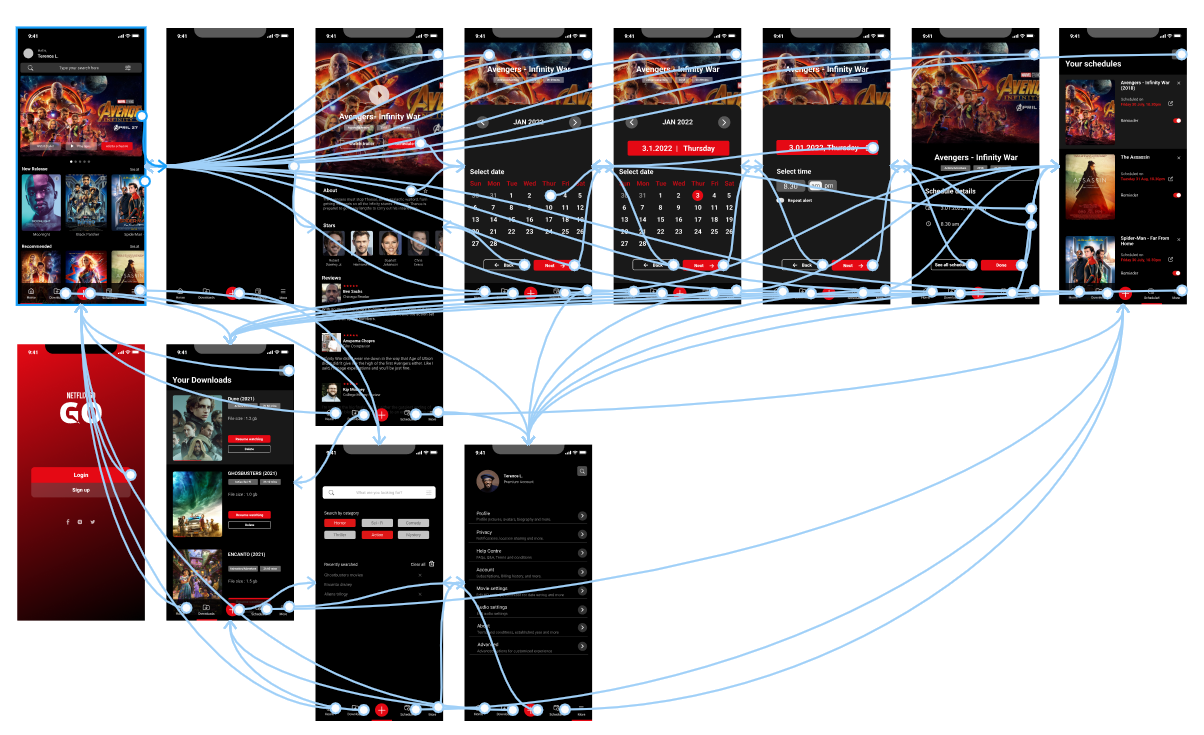
A digital wireflow is created to assess the feasibility of the user journey one might take while using the app. Done in Figma
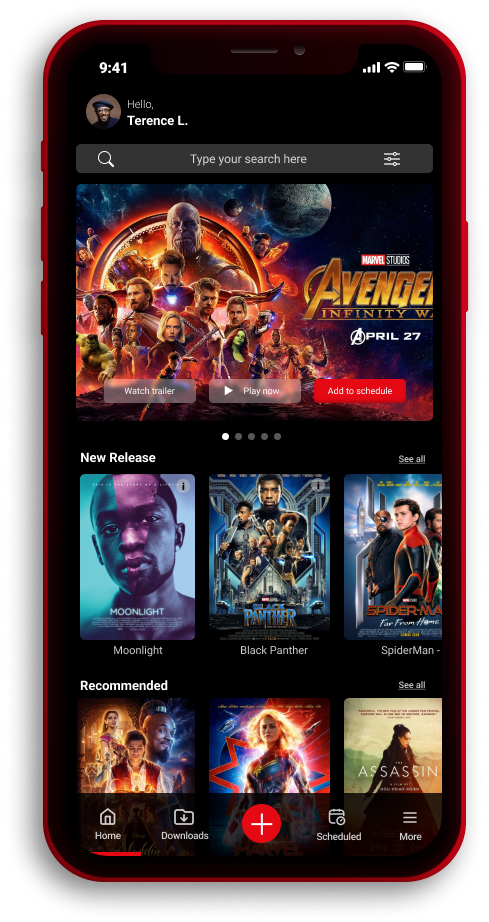
After several iterations on the low fidelity prototype, I proceeded to style and create the high fidelity prototype to bring out the final look of the product.
During my tackle on this case study, there were several challenges with the app that requires solutions that will be the best fit to solve user pain points.
.png)

As an avid movie watcher myself, working on Netflix Go concept study has been very rewarding. The addition of the scheduling app may seem obsolete to an already existing Netflix app, but there were definitely some gaps in the market I was able to cover in this case study.
I have also learned much from the research and usability tests conducted with actual users contributed several key elements that significantly improved the overall experience of the product.
One of the main problems that teenagers or students face during their academic phase in life is financial planning. Limited income (that mostly comes from their parents) with the lack of financial literacy makes saving money a tougher challenge for these young adults.
EZsave is an application that focus to helps students to save money, understand their expenses, and achieve their budget goals.
Designing an interface that allows its users to easily understand their expenditures
Creating comprehensible data
Creating a pleasant UI appearance while maintaining the focus on the main goals of the app
Create a secure verification process during the syncing of cards/banks
There were many competitors out there offering similar products. However after thorough research shows that the competitors lack certain features that really helps students like budgeting.
I have studied the competitors in areas of usability, layout, navigation structure, content, and UI.
Much of the available money saving apps were not UI optimized to give users the best experience. Proper usage of colors and aesthetics can give a different feel and interaction with the app
Most competitors platforms had very poor navigational convenience and practicality. Navigation between different modes of data visualization and in between tabs are not practical and user friendly in many cases.
There were many gaps and improvements that can be made in the data analysis feature. Good data visualization provides great insights to users prompting them to take action in order to achieve their short term financial goals.
Our user persona encompassed people of diverse ethnicity and culture backgrounds.
.png)
.png)
.png)
I decided to conduct unmoderated studies in order to access how usable the product is without any interference or guidance in order to truly access the usability of the app.
These are several prompt examples that I have used in the study :
Prompt 1 : Locate the add budget button
Prompt 1 follow up : How easy or difficult was is to accomplish this task? Is there anything you would change about the process?
Prompt 2 : Search for item to budgetPrompt 2 follow up : Was it easy or difficult to search for the items you were looking for to add into your budget?
Prompt 3 : Confirm and add budget
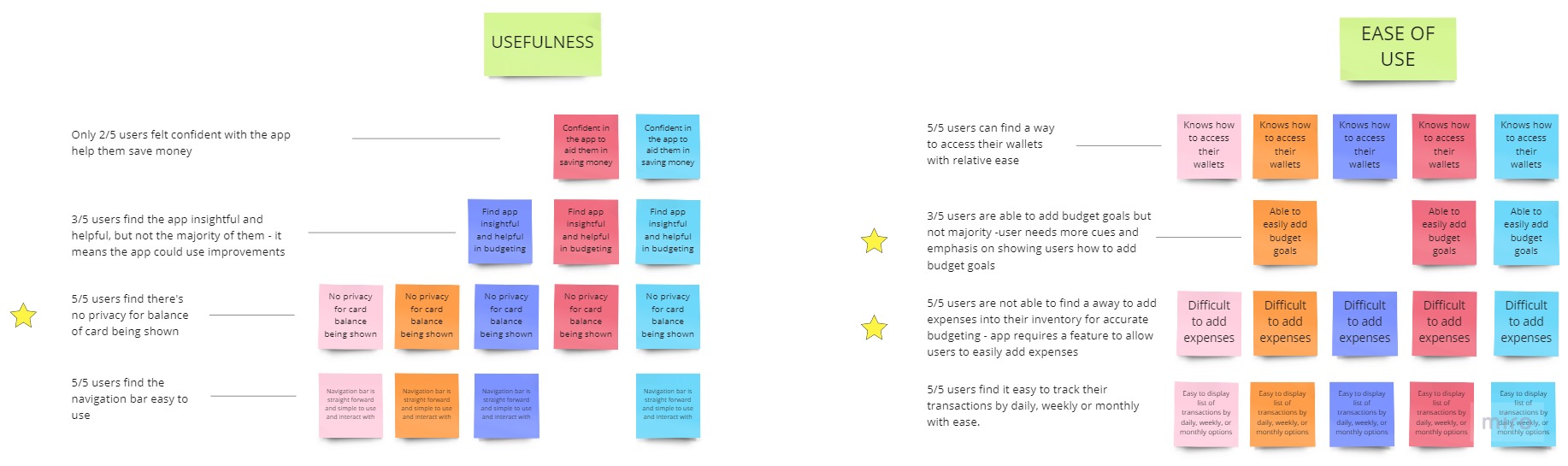
Research Insight #1
Students needs a more cues and emphasis for them to add budgets or expenses with relative ease.
Research Insight #2
Users want a privacy feature that hides their sensitive financial information
Research Insight #3
App requires a feature that easily allows its users to add expenses conveniently.
Research Insight #4
Addition of a progress bar would should users clearly how much further they are from their budgeting and other short term financial goals.
Scenario : Andy Lim is a full time local university student who is currently on a government-bond loan and would like to save money on the side for his hobbies and interests.
.png)
.png)
Sketching wireframes on a paper was an inexpensive and quick way to iterate multiple design ideas. I employed the crazy eight's exercise to come up with as much ideas as possible with each idea given 1 minute.
.png)
.png)
After finalizing on the paper wireframes, digital wireframes are created to provide a solid structure and framework to the product. At this stage, minimal colors are being used to keep focus on identifying issues related with functions and features.
.png)
To induce a feeling of wealth and sophistication, primary colors of purple with a clean secondary color of white is used for good overall contrast.

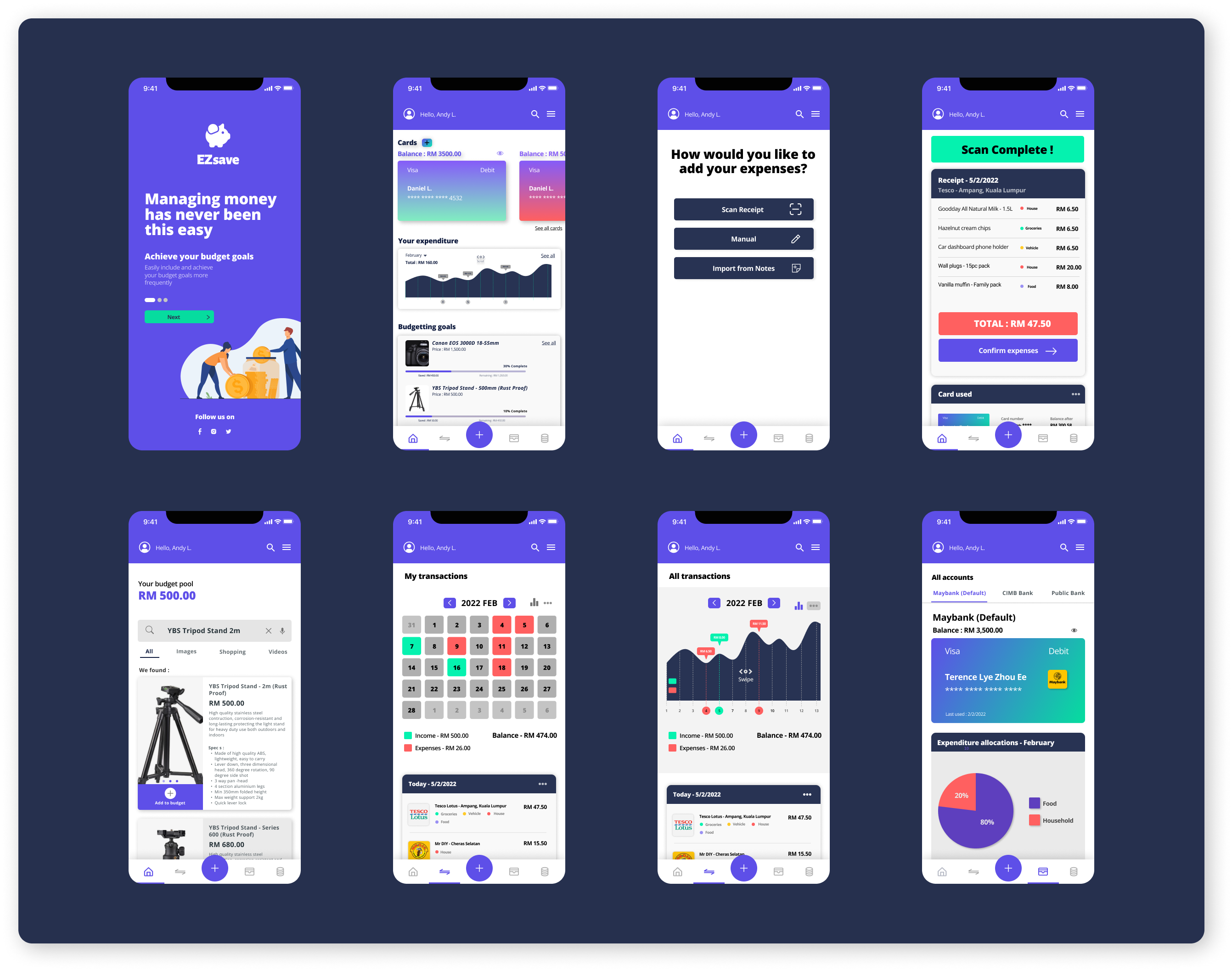
Shortly after low-fi wireframes have been developed, high fidelity wireframes are created to sense to an overall look and feel of the final designs.
In order to determine the usability of EZsave app, a usability test is conducted with 6 different participants in this research. Unmoderated research has been used in this test. The frustrations of the users can then be used to generate impactful insights that may help improve the overall experience of the app.
Research Insight #1
Research Insight #2
Research Insight #3
Research Insight #4
Research Insight #5
Research Insight #6
Research Insight #7
Other than for aesthetic purpose and displaying its brand voice, the splash page serves to show its users the core function of the app.
Aside from adding expenses, users can also easily edit details should there be any mistakes from scanning receipts. The app also offers insights from multiple choices of data visualizations from graph charts to expenditures allocations pie charts for better understanding
Aside from adding expenses, users can also easily edit details should there be any mistakes from scanning receipts. The app also offers insights from multiple choices of data visualizations from graph charts to expenditures allocations pie charts for better understanding
Expenditures & income of each wallet also includes data visualization that helps teenagers better understand their expenses and how to better manage them.
Insights helps in bringing the focus of the project into the right direction. I have learned to analyze research findings and derive key actionable insights from it that could ultimately affect the end results of any project.
Since colors are a key element in indicating expenses, income, and separating categories of expenditures in this project, I have learned to use colors more wisely in order not to confuse the users from achieving their main goal with the app
In this project, there were many potential issues that arise from many different touchpoints. A user journey map is a great way to empathize and prepare for potential shortcomings of the app.
In this project, I've learned to be self-aware whenever I think I am having bias towards certain design decisions. Therefore to combat this, I always go back to reliable research findings and data to get myself back on track.

.png)
.png)
.png)
.png)